Marked / Guides / Photo cleaner apps
The best photo cleaner app for iPhone, compared
Start with the free tools already inside Photos: Duplicates merges exact copies and Recently Deleted is your undo button. If that isn't enough, choose by how you want to decide. Swipe apps (Slider, Swipewipe, Marked) show you every photo and let you judge, while scanner apps (Cleanup, Clever Cleaner, CleanMy®Phone, Cleansmith) group duplicates, similar shots and big videos and suggest what to remove. For the most generous free tier among the scanners, try Clever Cleaner first. Full disclosure: I make Marked, so weigh what I say about it accordingly.
Start with what Apple already gives you
Before installing anything, it helps to know what Photos does on its own, because a few apps charge for things iOS already covers.
- Duplicates. Under Collections › Utilities › Duplicates, Photos lists exact copies and merges them for you. The duplicate photos guide covers the quirks.
- Recently Deleted. Everything you delete waits there for 30 days, whichever app did the deleting.
- Media Types. Screenshots, Videos, Bursts and Live Photos each get their own collection, so a whole category can be selected and deleted in bulk. Here's how to delete all your screenshots that way.
What Photos doesn't do: it won't group similar shots (separate photos of the same moment), and the library sorts only by date added or date taken, never by file size. Those two gaps are most of what cleaner apps are selling.
What to look for in a photo cleaner
The well-known apps in this category mostly sit between 4.4 and 4.8 stars, so ratings barely separate them. These four questions do:
- Does it delete only after you confirm? Look for a review step inside the app. iOS adds its own confirmation prompt and Recently Deleted on top, whatever the app does.
- Does scanning happen on the iPhone? Finding duplicates and lookalikes can be done on the device. Every app below except Swipewipe says so in its description; Swipewipe's description doesn't mention it either way.
- Swipe review or automatic picks? The biggest difference between them, covered next.
- How does it charge? Nearly all are free to download. What matters is what sits behind the paywall: weekly plans, yearly plans, one-time purchases or daily limits. The In-App Purchases list on the App Store page shows the options before you start a trial.
One extra check: the App Privacy section on each listing describes what the app collects beyond your photos, like identifiers and usage data. Read it for any app here, Marked included.
Swipe review or automatic picks?
Scanner apps do the sorting for you. They group lookalikes, mark a best shot and offer to clear the rest in one go. Swipe apps do the opposite: one photo at a time, and you decide. That's slower per photo, but you never have to wonder what got removed.
Swipe review
- You see every single photo
- Slower per photo, no surprises
- Suits kids, pets and trips
Automatic picks
- The app groups lookalikes, picks a best
- Fast on big piles of near-copies
- Its best shot may not be yours
Several apps mix the two. Clever Cleaner has a swipe mode next to its scanner, and Cleanup and Cleansmith show you the groups so you can change their picks before anything goes.
The apps, side by side
Ratings and rating counts are from the US App Store on 8 November 2026, rounded. Features and pricing models come from each app's own listing. Where a listing doesn't say something, neither do I.
| App and developer | Rating | How you review | How it charges |
|---|---|---|---|
| Photos (built in) Apple | Built in | Duplicates you merge; the rest by hand with Select | Free |
| Cleanup: Phone Storage Cleaner DEEP FLOW SOFTWARE SERVICES - FZCO | 4.7 (757K) | Automatic groups with a "Best" pick, final review screen | Free download; weekly or lifetime plan after a 7-day trial |
| Clever Cleaner: AI CleanUp App CleverFiles Inc. | 4.8 (85K) | Automatic groups with a Best Shot, plus a swipe mode | Free within daily limits; weekly plan (3-day trial) or one-time lifetime purchase |
| CleanMy®Phone: Cleanup Storage MacPaw Way Ltd | 4.6 (23K) | Automatic scan and AI categories; you choose what goes | Free download; yearly subscription after a 3-day trial |
| Cleansmith: Photo Cleaner Monocraft | 4.7 (4.1K) | Automatic groups, side-by-side compare, filters including file size | Free with in-app purchases (Premium subscription) |
| Swipewipe: Photo Cleaner MWM | 4.7 (101K) | Swipe, month by month | Free with in-app purchases |
| Photo & Video Cleaner: Slider June Ninth LLC | 4.8 (11.7K) | Swipe, then review before emptying its trash | Free with in-app purchases |
| Marked. Swipe Photo Deleter Emin Grbo (me) | 5.0 (2) | Swipe, side-by-side duplicates, review pile, hold to purge | Free to scan, swipe and mark; purging is paid |
Notes on each app
Cleanup: Phone Storage Cleaner
The most-rated app here by far, with about 757,000 ratings. Beyond photos (duplicates, similar shots, screenshots, lookalike videos) it compresses videos, cleans email and contacts, and throws in charging animations and a PIN-locked vault. Its listing promises a final review screen before anything is removed and says no files leave the phone. Best for people who want one app for every storage chore.
Clever Cleaner: AI CleanUp App
From CleverFiles, the makers of Disk Drill. It groups duplicates and similar photos with a Best Shot marked, sorts videos by size, converts Live Photos to stills and compresses media. The swipe mode (left to delete, right to keep) has no daily limit according to the listing, there's a Skip List for photos to leave alone, and deletions go to Recently Deleted. If you don't want to pay, start here.
CleanMy®Phone: Cleanup Storage
From MacPaw, the developer of CleanMyMac. It finds duplicates, similar and blurry photos, screenshots and large videos, compresses video, turns Live Photos into stills and sorts the library into AI categories like Travel, Pets and Documents. Photos marked Sensitive stay out of cleanups. Its last update was in June 2026, older than the others here.
Cleansmith: Photo Cleaner
The power-user option. Besides duplicates, similar shots and large files, it looks for closed eyes and low-resolution media, has its own Bursts and Selfies views, and filters by size, date, video length and a lot more. Similar photos can be compared side by side with zoom, and favorites are kept when you clean duplicates and similar shots. It compresses photos and videos too.
Swipewipe: Photo Cleaner
The most-rated swipe app in my search, from MWM. Swipe right to keep, left to delete, one month at a time. Around that sit an On This Day feature with streaks, a photo map, AI photo enhancement, a bookmark for maybe-later photos and help spotting similar, blurry and screenshot clutter. The App Store page lists weekly and yearly options among its in-app purchases.
Photo & Video Cleaner: Slider
The plainest of the swipe apps, rated 4.8 from about 11,700 ratings. Left to trash, right to keep, then a review of your deletions before you empty its trash. It handles videos, and its listing says everything happens on the device. The App Store page lists an annual Premium purchase.
Where Marked fits, honestly
I built Marked as a swipe app with a safety net. Swipe up to mark, down to keep, undo whenever. Marked photos go into a review pile, and nothing is deleted until you hold the Purge button. The home screen splits the work into piles (This Week, Screenshots, Duplicates, Similar, Videos), and duplicates show side by side with Keep This, Purge Rest. Photos are scanned on the iPhone and never uploaded, and there's an Assistive Access mode with two big buttons for helping a parent.
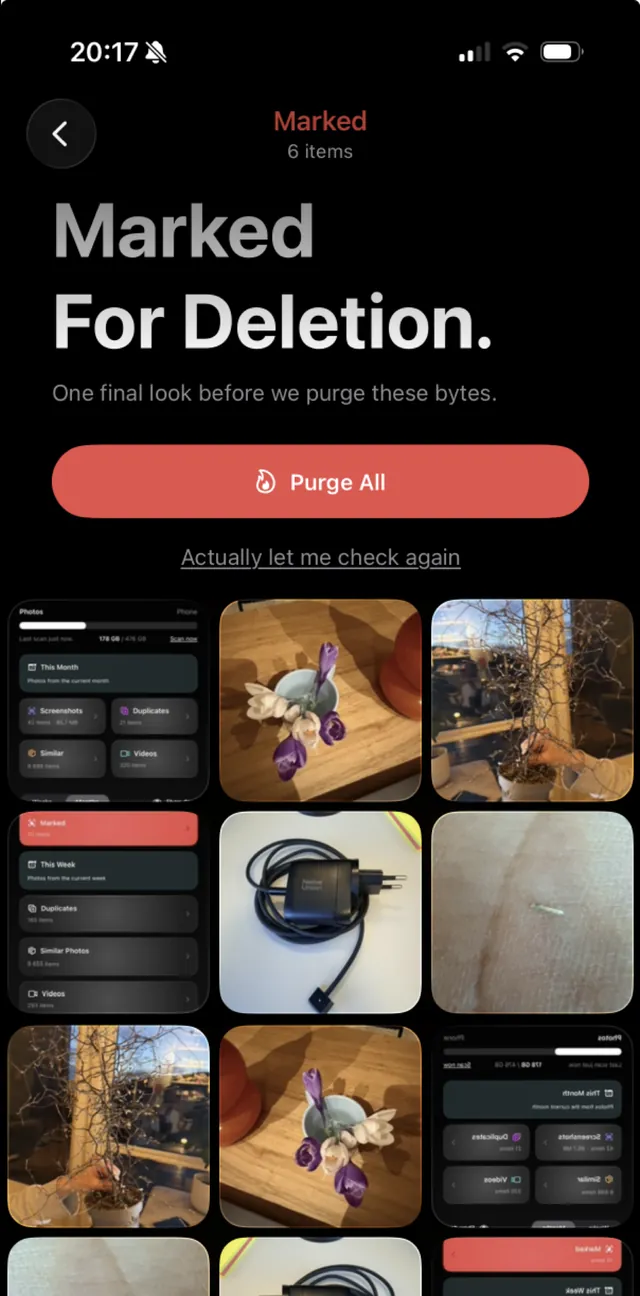
The trade-offs:
- Purging is paid. Scanning, swiping and marking are free, but deleting through Marked needs a purchase. Deleting by hand in Photos is always free.
- It's small. Two ratings on the App Store as I write this, from one developer in Norway. That's me.
- It needs iOS 26.1 or later, on iPhone or iPad, so older devices are out.
- It sticks to photos and videos. If you also want contacts or email cleaned, some of the scanners above do more.
Is there a good free photo cleaner?
Free with no strings: the Photos app. For exact copies, screenshots and old videos it does the job, if you don't mind tapping Select a lot. Every third-party app here is free to download, but free means different things. Clever Cleaner gives you daily limits and an unlimited swipe mode. Cleanup and CleanMy®Phone lead to a trial, then a subscription. Swipewipe, Slider and Cleansmith list in-app purchases without spelling out their free tier, so you'll find the wall by using them. Marked lets you scan, swipe and mark for free and charges for the purge.
Trials turn into subscriptions. If you start a free trial to clear one big backlog, check Settings › [your name] › Subscriptions afterwards and cancel before it renews if you're done.
Every cleaner deletes from iCloud too. With iCloud Photos on, a delete in any of these apps removes the photo from all your devices. To clear the phone but keep the cloud copy, read how to delete photos from iPhone but not iCloud before you start.
Want to see every photo before it goes?
Marked is the swipe option with a review pile: mark freely, rescue anything, delete only when you hold Purge.
Download on the App StoreNotes: ratings, rating counts and listing details were read from the US App Store on 8 November 2026 and will drift. Menu names match iOS 26 and iOS 27. I make one of the apps on this list, which is exactly why every claim about the others comes from their own listings and not from my opinion of them.